
One of the most useful features in SignageFlow is the fallback playlist.
A fallback playlist is your backup content. It helps make sure a screen still has something to play when the main playlist is not available.
This is especially helpful when:
a playlist has not started yet
a playlist has already ended
a scheduled playlist is no longer active
a screen needs a safe default playlist to fall back on
Instead of leaving a screen with nothing to show, SignageFlow can automatically switch to fallback content.
Why fallback playlists matter
In real-world signage, things change all the time.
A campaign may be scheduled for next week. A promotion may expire today. A scheduled playlist may only run during certain hours. When that happens, you do not want your screens to go blank.
Fallback playlists give you a safety net.
They make sure your screens can continue showing useful, branded, or evergreen content until the next main playlist becomes active.
The two types of fallback playlists
SignageFlow supports two levels of fallback playlists:
Screen-level fallback playlist
Workspace-level fallback playlist
Both serve the same purpose, but they are set in different places and used in a different order.
1. Screen-level fallback playlist
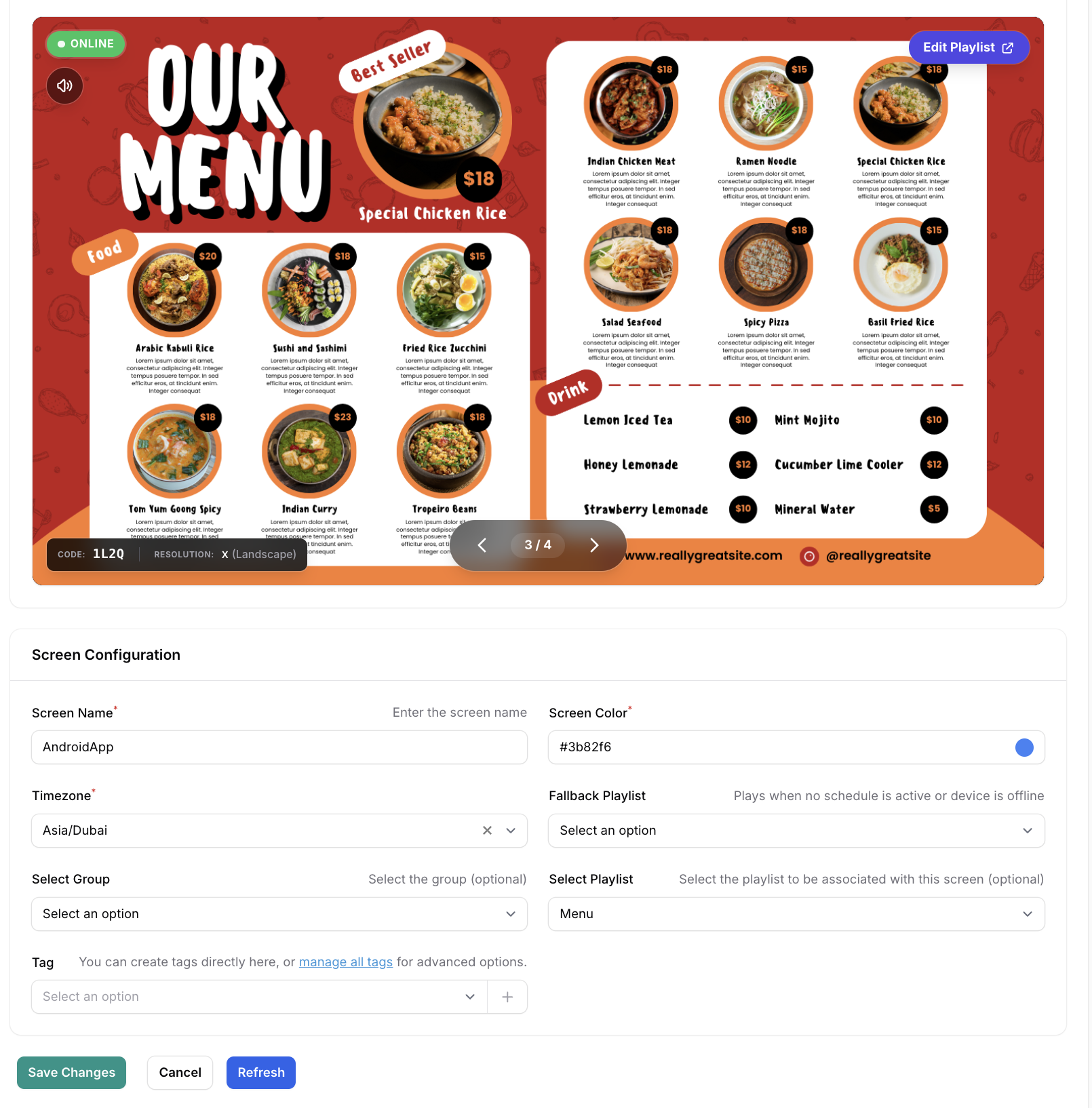
The screen-level fallback playlist is set for one specific screen.
You can configure it in the screen edit page.
This is the best option when one screen needs its own special backup content.
Example
Imagine you have a screen at the front desk of one branch.
Its normal playlist may change often, but if that playlist is unavailable, you may still want this screen to show:
a welcome message
branch contact details
opening hours
brand slides
In that case, you can assign a screen-level fallback playlist just for that screen.
If the main playlist cannot be used, that screen will switch to its own fallback.
When screen-level fallback is useful
A screen-level fallback works well when:
a specific screen has a unique role
one branch needs different backup content from the rest
you want tighter control over a single screen’s backup behavior
2. Workspace-level fallback playlist
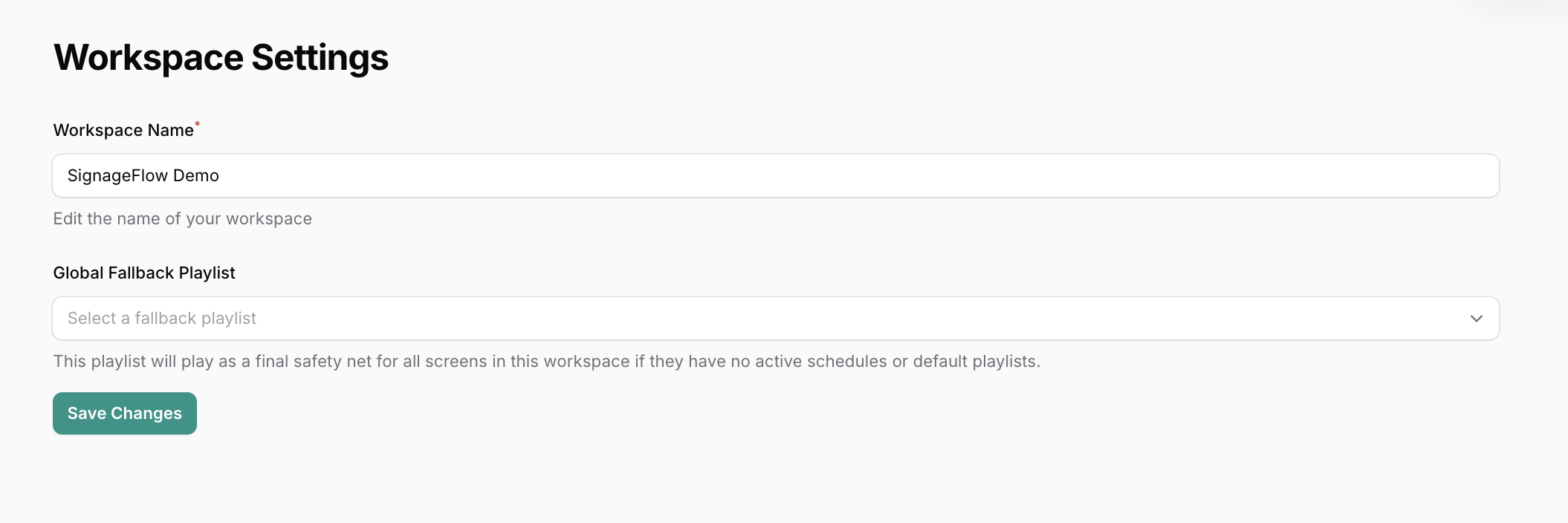
The workspace-level fallback playlist is the broader backup for the whole workspace.
You set this in Workspace Settings under the user dropdown.
This is useful when you want one shared fallback playlist that can support all screens in the workspace.
Example
Suppose you manage many screens across multiple branches.
You may want every screen to have a reliable default backup, such as:
company branding
evergreen promotions
support information
standard announcements
Rather than setting the same backup on every screen one by one, you can set a workspace-level fallback playlist once.
That way, screens in the workspace can use it whenever needed.
When workspace-level fallback is useful
A workspace-level fallback works well when:
you want a shared backup across all screens
you want consistency across branches
you want a simple safety net without configuring every screen individually
Which fallback gets used first?
If both fallbacks are set, SignageFlow checks them in this order:
Screen-level fallback playlist
Workspace-level fallback playlist
So the screen-level fallback has priority.
That means if a screen has its own fallback playlist, SignageFlow will try to use that first. If it does not have one, or if that fallback is not usable, then the workspace-level fallback becomes the next backup.
A simple real-world example
Let’s say a retail screen is assigned a campaign playlist called Weekend Sale.
Main playlist
Weekend Sale
Screen-level fallback
Branch Welcome Playlist
Workspace-level fallback
Corporate Brand Playlist
Now imagine what happens across a few different situations.
Situation 1: the main playlist has not started yet
The Weekend Sale playlist is scheduled for later, so it is not active yet.
SignageFlow checks for backup content.
Because the screen has its own screen-level fallback, it will play Branch Welcome Playlist.
Situation 2: the main playlist is active
The Weekend Sale playlist is active and available.
So the screen plays Weekend Sale as normal.
Situation 3: the main playlist has ended
Once Weekend Sale is over, it is no longer used.
SignageFlow checks for fallback again and uses Branch Welcome Playlist.
Situation 4: there is no screen-level fallback
If that screen did not have its own fallback, then SignageFlow would use the Corporate Brand Playlist from workspace settings.
What kind of content should go in a fallback playlist?
A fallback playlist should usually contain content that stays useful at any time.
Good fallback content often includes:
brand slides
welcome messages
branch information
opening hours
service highlights
contact details
evergreen promotions
In other words, fallback content should be safe, clean, and always appropriate to show.
Best practice for customers
A good approach is:
use screen-level fallback when a specific screen needs its own backup content
use workspace-level fallback as the wider safety net for everything else
This gives you both flexibility and consistency.
Final takeaway
Fallback playlists are there to keep your screens running smoothly when the main content is not available.
The key points are simple:
the screen-level fallback playlist is set in the screen edit page
the workspace-level fallback playlist is set in Workspace Settings under the user dropdown
if both exist, the screen-level fallback is used first
if no screen-level fallback is available, the workspace-level fallback is used