
Sometimes, the content you need for your digital signage already exists on the web. Whether it’s a live data dashboard, a company portal, or a public information page, the SignageFlow Website App allows you to bring the internet directly to your screens. By embedding live URLs, you can leverage existing web assets without having to recreate them from scratch.
What the Website App Does
The Website app functions as a dedicated browser window within your signage. It pulls a live web page and displays it as part of your playlist. It’s the ultimate tool for "set-it-and-forget-it" content—as the website updates, your signage updates automatically.
How It Works: The 4-Step Integration
Bringing web content to your displays is incredibly straightforward:
Initialize: Create a new Website app and give it a clear name (e.g., "Daily Sales Tracker").
Input the URL: Paste the full destination address of the website you want to display.
Optimize Loading: Toggle Pre-render / Pre-load to ensure a smooth transition when the website appears in your playlist.
Publish: Add the app to your playlist and hit publish.
Configuration Fields Breakdown
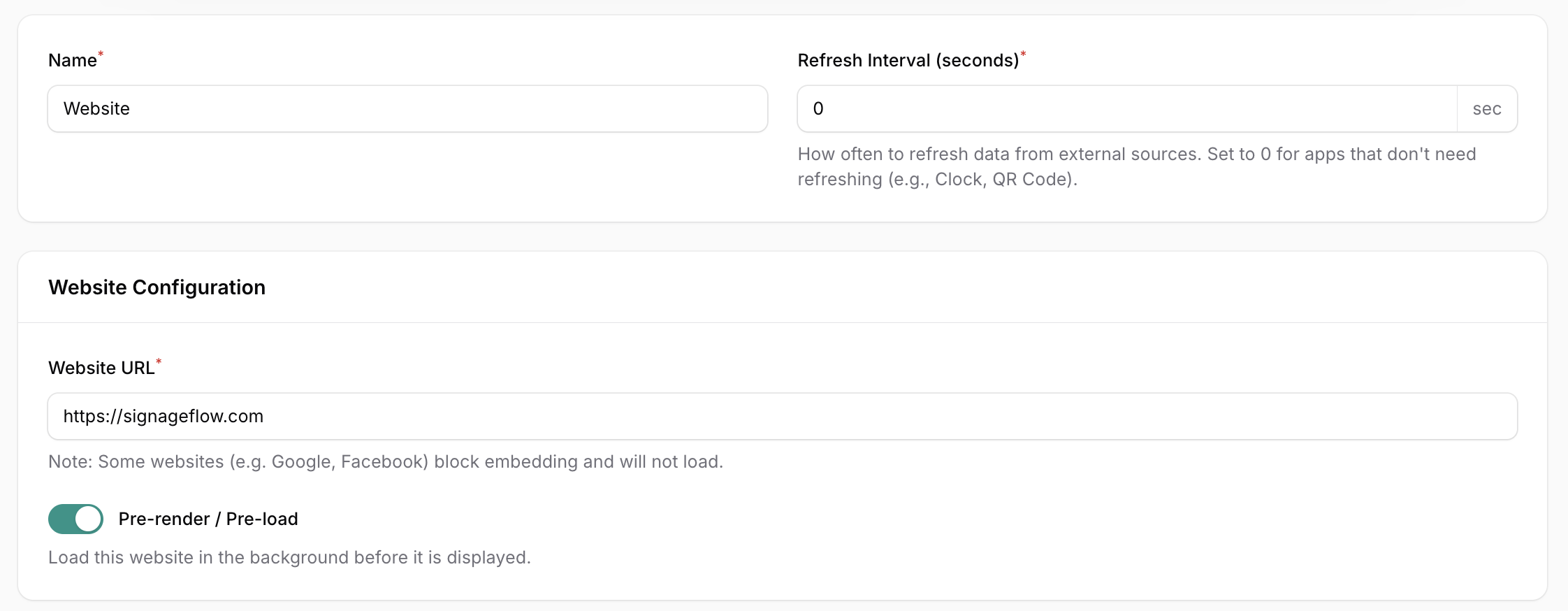
Core Website Settings
Name: The internal label for this app instance.
Refresh Interval (seconds): Frequency of page reloads. Set to 0 if the website handles its own live updates (like a stock ticker or dashboard).
Website URL: The direct link to the page you wish to embed (e.g.,
https://signageflow.com).Note: Some high-security sites like Google or Facebook block embedding for security reasons and may not load.
Performance Controls
Pre-render / Pre-load: When enabled, the app loads the website in the background before it’s scheduled to appear. This eliminates the "white screen" effect or loading lag, ensuring your content is visible the moment the slide transitions.
Strategic Use Cases
Internal BI Dashboards: Display real-time sales targets, support ticket volumes, or warehouse KPIs using URLs from tools like PowerBI, Tableau, or custom internal dashboards.
Booking & Status Pages: Keep customers informed with live "Queue Status" or "Meeting Room Availability" pages that update the second a status changes.
Public Portals & Directories: Use the app to show local transport schedules, building directories, or visitor information pages in high-traffic lobbies.
Real-World Examples
"Sales Dashboard Screen": A full-screen live view of a company's CRM dashboard, providing instant motivation for the sales floor.
"Queue Status": A service desk display that shows the current "Now Serving" number from a web-based queue management system.
"Visitor Information": An interactive lobby screen showing the company's "Contact Us" or "Location Map" page directly from their main website.