Understanding Playlist-Level Scheduling in SignageFlow
Playlist-level scheduling in SignageFlow helps you control when a playlist should be active, and when individual media items inside that playlist should appear.
This is useful when you want to prepare content in advance and let it go live automatically on the right dates, without needing to manually update screens every time a campaign changes.
There are two parts to playlist-level scheduling:
Playlist start and end dates
Media item start and end dates inside the playlist
There is also one important thing to keep in mind: if a playlist is not active, SignageFlow may use a fallback playlist instead. We cover fallback playlists in detail in a separate post, but it is helpful to mention them here because they are part of what happens when a playlist has not started yet or has already ended.
What playlist-level scheduling means
A simple way to understand it is:
the playlist dates control the playlist itself
the media item dates control what is allowed to appear inside that playlist
So for a media item to show on screen:
the playlist must be active
the media item must also be active
If either one is outside its valid date range, that content will not appear.
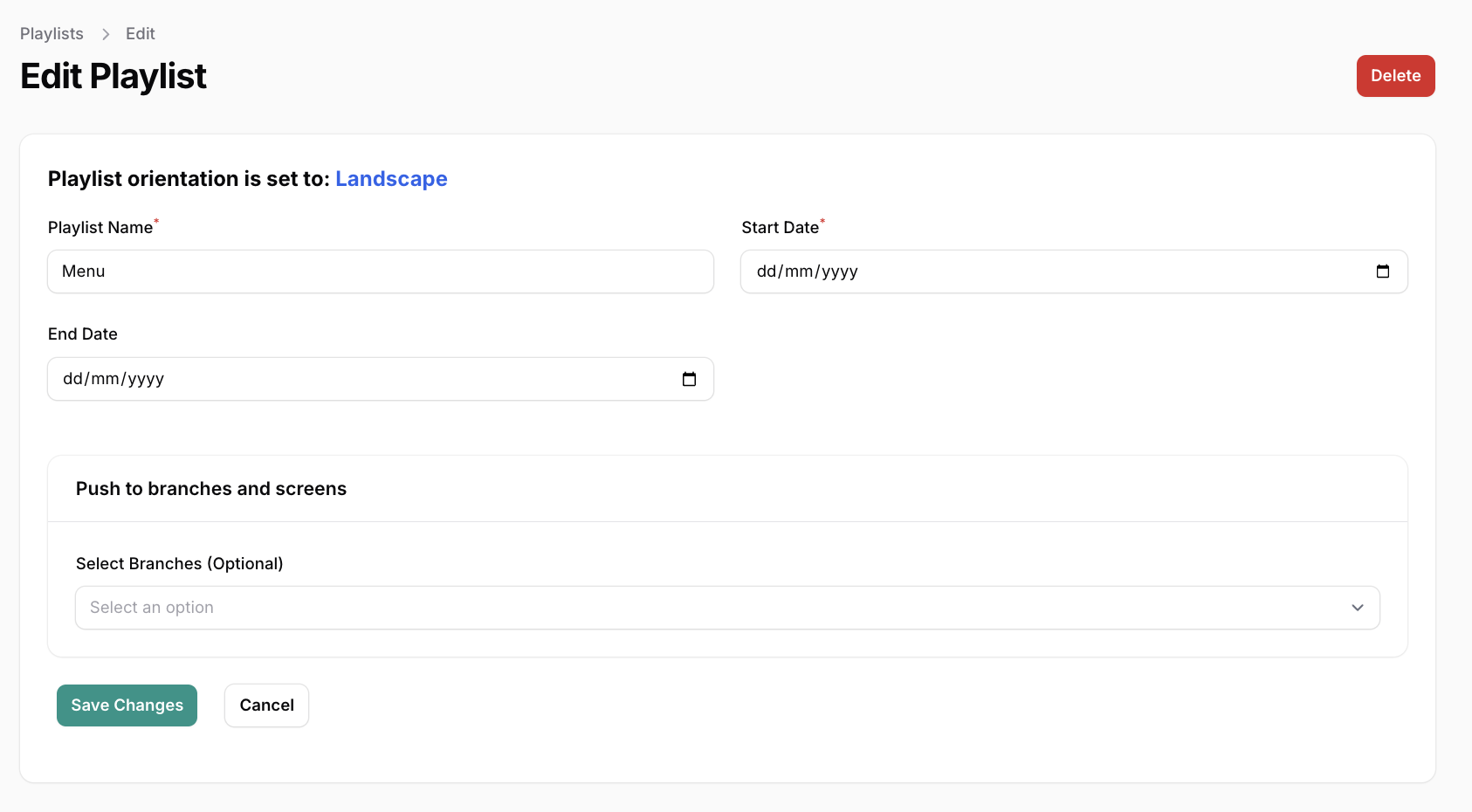
How playlist dates work
A playlist can have:
a start date
an end date
These dates decide whether the playlist is currently considered active.
If the playlist start date has not arrived yet
The playlist is not active yet.
That means SignageFlow will not use it for playback until its start date begins.
If that playlist is assigned to a screen, SignageFlow will then look for another valid option, such as a scheduled playlist or a fallback playlist.
If the playlist end date has passed
The playlist is no longer active.
That means SignageFlow stops using it for playback.
The playlist still exists in your account, but it is treated as finished. If the screen needs content, SignageFlow can move to another valid option, including fallback playlists.
Example
Imagine a playlist called Summer Promotion:
Start date: June 1
End date: June 30
What happens?
On May 28, it has not started yet, so it does not play
On June 10, it is active, so it can play
On July 1, it has ended, so it stops being used
If the screen has a fallback playlist configured, that fallback can take over when the main playlist is not active.
How media item dates work
Inside the playlist, each media item can also have its own:
start date
end date
You get the below screen by clicking on the calendar icon on the media item row.
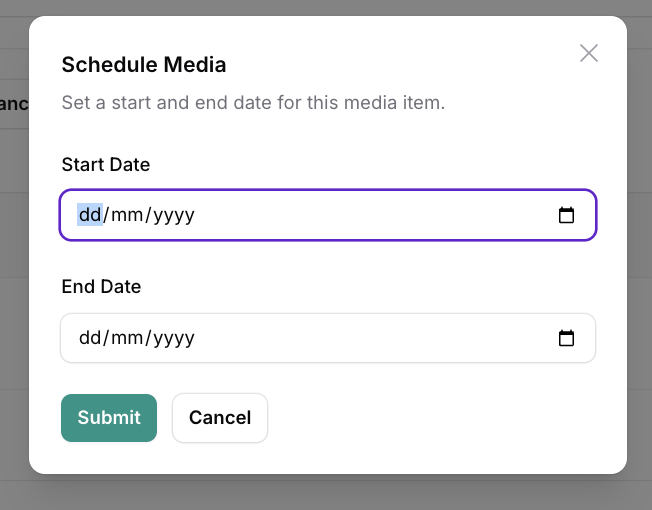
This gives you more flexibility. You can keep one playlist active for a longer campaign, while different items appear during different parts of that campaign.
If a media item has not started yet
It stays inside the playlist, but it does not show on screen yet.
If a media item has expired
It stays saved inside the playlist, but it is skipped during playback.
It is not deleted. It simply stops appearing unless you update its dates.
A practical example
Let’s say you create a playlist called Ramadan Campaign.
Playlist dates
Start date: March 1
End date: March 31
This means the playlist itself is active only during March.
Inside that playlist, you add the following items:
Media item 1
Ramadan Welcome
Start date: March 1
End date: March 31
This appears for the whole month.
Media item 2
Weekend Family Offer
Start date: March 7
End date: March 9
This appears only for that weekend.
Media item 3
Mid-Month Combo
Start date: March 15
End date: March 20
This appears only in the middle of the month.
Media item 4
Eid Teaser
Start date: March 25
End date: March 31
This appears near the end of the campaign.
What the screen shows
On March 3:
Ramadan Welcome
On March 8:
Ramadan Welcome
Weekend Family Offer
On March 18:
Ramadan Welcome
Mid-Month Combo
On March 28:
Ramadan Welcome
Eid Teaser
On April 1:
this playlist is no longer active, so it stops being used
At that point, if the screen has another valid playlist source, such as a fallback playlist, SignageFlow can use that instead.
Where fallback playlists fit in
Playlist-level scheduling decides whether a playlist is active.
But customers often ask: what happens when it is not active?
That is where fallback playlists matter.
If a playlist has:
not started yet
already ended
no valid media items available at that moment
SignageFlow can use a fallback playlist so the screen does not sit empty.
There are two fallback levels in SignageFlow:
a screen-level fallback playlist
a workspace-level fallback playlist
We explain those fully in a separate fallback playlist blog post, but the important point here is simple:
When a playlist is outside its active date range, fallback content may take over.
Why playlist-level scheduling is useful
Playlist-level scheduling is especially helpful when you want to plan content ahead of time.
It works well for:
seasonal campaigns
holiday promotions
limited-time offers
event announcements
awareness campaigns
branch-specific messaging
Instead of creating a brand-new playlist every few days, you can keep one structured playlist and control timing through dates.
Common customer questions
What happens if a playlist has not started yet?
The playlist is treated as not active yet, so it will not be used for playback. If another valid option exists, such as a fallback playlist, SignageFlow can use that instead.
What happens if the playlist end date has passed?
The playlist is treated as finished and stops being used for playback. At that point, another valid playlist, including a fallback, may take over.
What happens if a media item has expired?
The media item stays in the playlist, but it no longer appears on screen.
Is the media item deleted when it expires?
No. It remains saved in the playlist. It is simply skipped during playback.
Final takeaway
Playlist-level scheduling helps you make sure the right content appears during the right date range without constant manual switching.
The playlist controls the campaign window.
The media items control the timing inside that campaign.
And if the playlist is not active, fallback playlists can help keep the screen running with backup content.