The scheduler in SignageFlow helps you control when a playlist should play on a screen.
If playlist-level scheduling is about whether a playlist or media item is active by date, the scheduler is about time-based playback. It lets you decide which playlist should run at a certain hour, on a certain day, or across a repeating schedule.
This is what makes it possible to automate screen content throughout the day without needing to manually switch playlists.
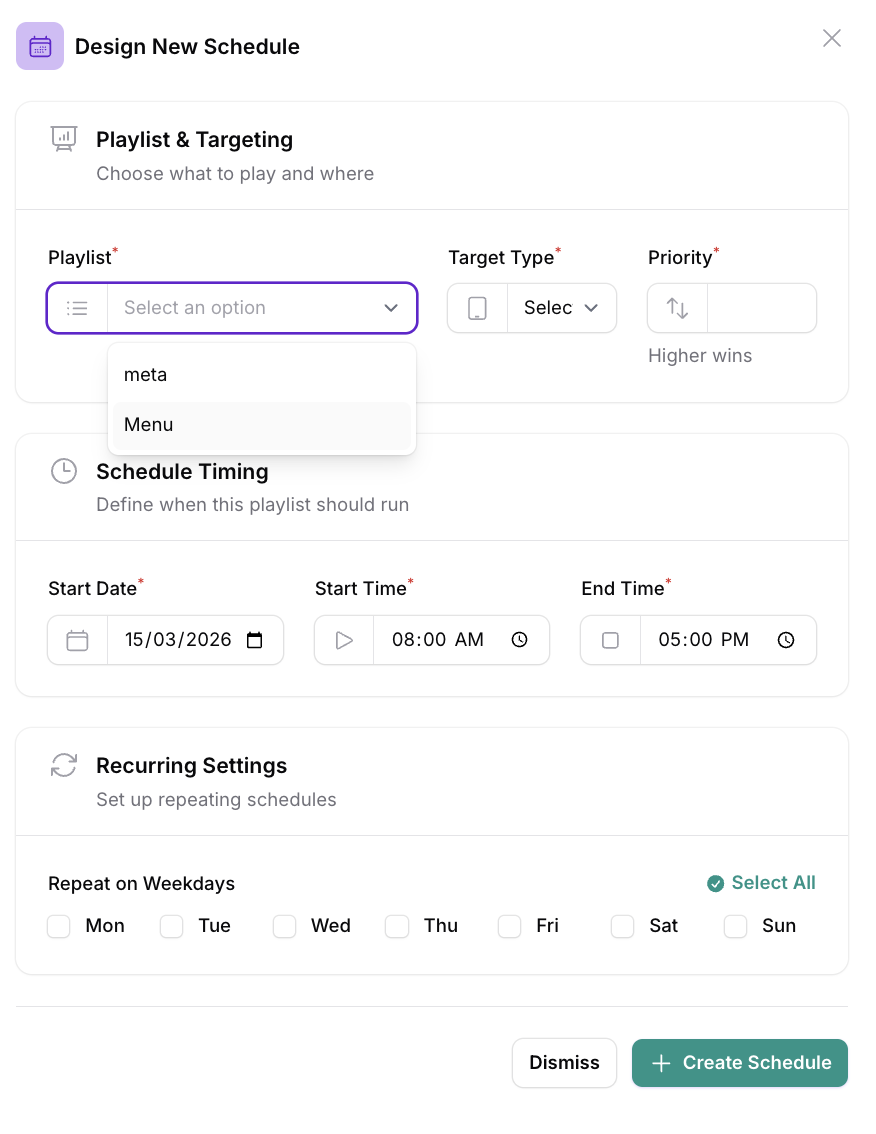
What the scheduler does
The scheduler answers one simple question:
“What playlist should this screen be playing right now?”
This is different from playlist-level scheduling.
Playlist-level scheduling controls whether a playlist is active by start and end dates
The scheduler controls when a playlist should take over a screen based on time and day
So even if a playlist is active, it will only play during its scheduled time if you are using the scheduler.
A simple way to think about it
Think of the scheduler like a timetable for your screens.
You choose:
which playlist should play
on which screen or group of screens
on which date
at what start time
at what end time
Once that is set, SignageFlow handles the switching automatically.
Why the scheduler is useful
The scheduler is useful when your content changes during the day or across the week.
This is common in many businesses.
For example:
a restaurant may need breakfast, lunch, and dinner menus at different times
a retail store may want weekday branding and weekend offers
an office may want different content in the morning and evening
a clinic may want different playlists during working hours and after hours
Instead of changing screens manually, you can schedule the playlists once and let SignageFlow take care of it.
Example: restaurant schedule
A restaurant might create three playlists:
Breakfast Menu
Lunch Specials
Dinner Menu
Then set the scheduler like this:
Breakfast Menu from 7:00 AM to 11:00 AM
Lunch Specials from 11:00 AM to 4:00 PM
Dinner Menu from 4:00 PM to 11:00 PM
What happens?
At 9:00 AM, the screen shows Breakfast Menu
At 1:00 PM, it switches to Lunch Specials
At 7:00 PM, it switches to Dinner Menu
The business does not need to manually update the screen every few hours. The scheduler does it automatically.
Example: retail schedule
A retail business might want a different rhythm across the week.
For example:
Monday to Thursday: Brand Campaign
Friday: Weekend Sale Launch
Saturday and Sunday: Special Offers
With the scheduler, those playlists can take over at the right times and on the right days without extra work from the team.
How the scheduler works together with playlist dates
This is an important point.
The scheduler decides when a playlist should play, but the playlist still needs to be valid.
That means if a playlist is scheduled for a time slot, but its own playlist dates say it has not started yet or has already ended, it may not be used.
So the scheduler and playlist-level scheduling work together.
In simple terms
the scheduler decides whether it is the right time
the playlist dates decide whether the playlist is active
the media item dates decide which items inside that playlist can appear
All of these checks help make playback more reliable and organized.
What happens if a scheduled playlist is no longer available?
Customers often ask this.
A scheduled playlist might not be available because:
its playlist start date has not arrived yet
its playlist end date has passed
it has no valid media items available at that moment
When that happens, SignageFlow does not just ignore the screen.
This is where fallback playlists come in.
How fallbacks support the scheduler
If a scheduled playlist cannot be used, SignageFlow can move to another valid playlist option, including a fallback playlist.
There are two fallback levels:
screen-level fallback playlist
workspace-level fallback playlist
So if a scheduled playlist is not valid at that moment, the screen can still continue playing backup content instead of being left without content.
A full explanation of fallback playlists can be linked in your separate fallback blog post, but it is important to mention them here because they are part of the scheduler experience.
Example with scheduler and fallback
Let’s say a screen has this setup:
Scheduled playlist
Lunch Promotion
Runs from 12:00 PM to 3:00 PM
Screen-level fallback
Branch Welcome Playlist
Workspace-level fallback
Corporate Brand Playlist
Now let’s walk through the day.
At 10:00 AM
The Lunch Promotion schedule has not started yet.
So the scheduled playlist does not take over yet.
If there is no other active main playlist, SignageFlow can use the screen-level fallback, which would be Branch Welcome Playlist.
At 1:00 PM
The Lunch Promotion schedule is active.
So the screen switches to Lunch Promotion.
At 4:00 PM
The Lunch Promotion schedule has ended.
So SignageFlow stops using it.
If there is no other active playlist to use, the screen can return to Branch Welcome Playlist. If no screen-level fallback exists, it can use the workspace-level fallback instead.
Another example: office communication screens
An office may want:
Morning Announcements from 8:00 AM to 11:00 AM
Meeting Room Reminders from 11:00 AM to 5:00 PM
Employee Highlights from 5:00 PM to 8:00 PM
This lets the same screen change purpose through the day.
If one of those scheduled playlists is no longer valid or has already ended, fallback content can keep the screen useful until the next playlist takes over.
What the scheduler is best for
The scheduler is ideal when you want playlists to change by:
time of day
day of week
business hours
branch activity
recurring promotions
event windows
It is especially useful for teams that want screens to behave automatically across multiple locations.
Common customer questions
Does the scheduler replace playlist-level scheduling?
No. They work together.
The scheduler decides when a playlist should run. Playlist-level scheduling decides whether that playlist and its media are active.
What happens if the scheduled time starts but the playlist is not valid?
If the scheduled playlist cannot be used, SignageFlow can move to another valid playlist, including a fallback playlist.
What happens after a scheduled playlist ends?
Once its scheduled time is over, it stops taking over the screen. Another valid playlist or fallback can then be shown.
Can fallback playlists help with scheduled playback?
Yes. Fallback playlists are an important backup when scheduled content is not available.
Final takeaway
The scheduler in SignageFlow helps you automate when playlists play on your screens.
It is best understood like this:
the scheduler controls when a playlist should take over
playlist-level scheduling controls whether that playlist is active by date
media item dates control which items inside the playlist can appear
fallback playlists help keep screens showing content when the scheduled playlist cannot be used
That combination gives you much better control over day-to-day screen playback, while also making sure your screens have a reliable backup plan.
If you want, I can also help you turn all three blog posts into a consistent series with matching titles, intros, and closing CTA style.